Fix: MS10-049 and SSL problems connecting to https:// sites or Google Talk
Friday, August 20, 2010Problem
When connecting to Google Talk, or to some other SSL based sites using Internet Explorer or any browser that uses the operating system's SChannel libraries, the connection to the site fails.
Other things you might see
TLS v1.0 is turned off.
Wireshark shows a reset happening very shortly after the Client Hello for SSL.
The Fix
Use SCVS for TLS:
For non Windows 7 hosts, apply this fix (Reference)
Fire up RegEdit, navigate to:
HKEY_LOCAL_MACHINE\System\CurrentControlSet\Control\SecurityProviders\SCHANNEL
Create a new DWORD item called "UseScsvForTls" and set it equal to 1
I'm not sure if this was unique to our environment, but we discovered TLS 1.0 was disabled and the above fix didn't cover that. To enable TLS 1.0 in IE, select Tools|Internet Options|Advanced Tab. Scroll to the bottom and check the box that says TLS 1.0.
But why?
In at least some cases, a proxy server monitoring https traffic was interfering with the connection. If the proxy was bypassed, all was well with the world on Windows 7 and lower hosts. If the proxy was not bypassed, hosts failed without this registry key, and Windows 7 hosts failed at all times since the Windows 7 patch pays no attention to that registry key.
Obviously it's something related to the patch and the proxy server in my case, but I'm not sure what. I'll update this when I find out.
Other Posts on the Subject
Google Talk Support Forum Entry (No, I wasn't the original poster, but I replied)
Specific Incompatibility with Cisco VPN 3000 concentrators

The importance of taking intent into account
Tuesday, April 20, 2010The issue was (surprise) of intent. I was surprised to learn that in Michigan (at the time ... this may have changed), shop-lifting had to be intentional (or at least had an out for the absentminded). This protected the guy who forgot about the case of soda at the bottom of the cart while loading items on the belt while checking out.
I argued that intent was important based on a pre-WWW experience I had as a teenager. I had walked into a CVS, my girlfriend had purchased a few items and I had started reading the ingredient list on a pack of Certs (just what is Retsyn). Distracted, I walked out without paying for the breath-mints and we went to see a movie. I realized after the movie that I had not paid for the roll of Certs that I had half-eaten. Since I was now a common thief and wanted to rid myself of that personal blight, I went back to the drug-store, and paid up. All was well with the world. I got to keep up my streak of never shoplifting or stealing (to my knowledge) and the store got paid for the item I absentmindedly had forgotten to pay for.
This got into traffic law. Practically everyone thinks they're a good driver and yet everyone has had cause to be yelled at by another driver on the road entirely by accident. It's the single biggest reason that it's a bad idea to have something representing your church or political beliefs on your car, why inflict your mistakes on others?
I have no statistics to back it up, but I'm guessing that most of us have received a warning or citation for violating a speed limit, turning on red when there's a "no turn on red" sign, being the third car at the yellow light turning left or some other traffic law. Intent is not taken into account because you're *supposed to be paying attention* so as not to endanger the lives of other people.
Traffic/road laws where I'm from are strict and extensive. Enforcement, however, is limited by ratio of traffic patrol officers to ... well ... traffic. This is balanced by the idea that traffic enforcement officers take intent into account, if for no other reason than to be efficient with their own time.
On the right roads, there's no time to waste on the folks going 1-5 MPH over the limit, or the folks who cut a yellow light a little too close.
Take the human judgment aspect out of the picture, though, and those restrictive laws turn us all into "criminals by accident". Automation without human oversight and "Zero Tolerance" laws eliminate good judgment. (see fark.com or drudgereport.com for examples).
The child who brings a butter knife to school to better manage his turkey sandwich is being treated like the kid who brought a gun. The responsible driver who looks in his rear-view mirror, and assesses the road conditions before deciding whether or not to slam on the brakes at a yellow light is trained to choose between his life at the will of a cement truck driver or a ticket and higher insurance rates. A red light camera doesn't take that into account even if a judge might. Time and court costs are money.
As someone with a 60 mile round-trip trek for work, speed cameras are the worst. While attempting to safely drive you might focus less on the dashboard and more on the vehicles around you, especially if you're surrounded by someone who appears to be in more of a hurry than they should be. The idea of being hit with a ticket without the circumstances or "intent" being taken into account is scary to me.
But maybe I'm wrong?
Buy.com and Amazon.com, are they family now?
Friday, March 12, 2010Why do I save $53.10 buying from buy.com via amazon.com, rather than just buying directly from buy.com?
In my ever "deadline missed" project of getting my basement and home theater setup finished, as well as free up a rec room upstairs, I was looking for a wall mountable server/network equipment rack.
Through my favorite resource, I was able to find a 12U model that fit my needs precisely.
I have a pretty large gift card balance at buy.com (I am an affiliate as well, so take that how you want), so I thought I'd check to see if they offered the rack. They did.
Racks of the type I'm looking for are heavy, so the shipping was $53.10. I expected that.
Coincidentally, I also have a gift card balance at Amazon.com so I decided to check them out, knowing that they usually offer free shipping over a certain price.
Here's the result:
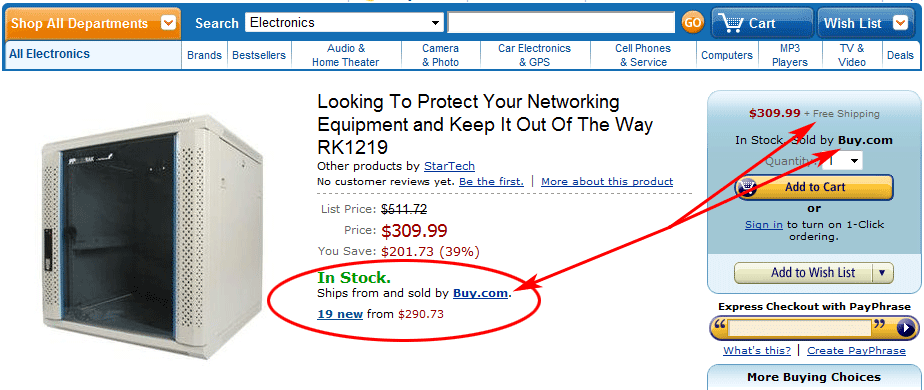
Buy.com sells via Amazon and I get free shipping! (The part number in the title omit's the "WALL", but it's there if you scroll down)
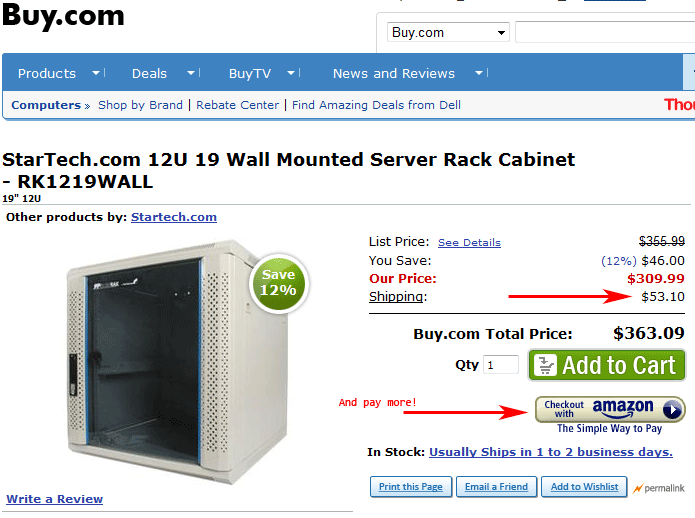
Buy.com's own web site costs me $53.10 more, and I can even use Amazon Checkout!
Here's the e-mail I sent to Buy.com via their customer service interface (I didn't bother calling, this basement project is not getting completed any time soon):
Please refer to these two links:
http://www.buy.com/prod/startech-com-12u-19-wall-mounted-server-rack-cabinet-19-12u/q/loc/101/203033503.html
and
http://www.amazon.com/Looking-Protect-Networking-Equipment-RK1219/dp/B000IE7ZE2
Identical product, and ironically, YOU are the ones selling it through Amazon. However, if I purchase it indirectly from you via Amazon, I don't have to pay $53 shipping. As I have a larger gift card balance with you, I'd prefer to buy it directly from you instead of indirectly from you via Amazon. Can you credit me the shipping or match your offer on their site?
http://www.buy.com/prod/startech-com-12u-19-wall-mounted-server-rack-cabinet-19-12u/q/loc/101/203033503.html
and
http://www.amazon.com/Looking-Protect-Networking-Equipment-RK1219/dp/B000IE7ZE2
Identical product, and ironically, YOU are the ones selling it through Amazon. However, if I purchase it indirectly from you via Amazon, I don't have to pay $53 shipping. As I have a larger gift card balance with you, I'd prefer to buy it directly from you instead of indirectly from you via Amazon. Can you credit me the shipping or match your offer on their site?
I've gotten the auto-reply, and another one a day later indicating that they had to look into the issue and that it will take another 1-2 business days.
Based on my gift card balances, it would be less expensive to buy it from buy.com, but it would make far less sense financially. Buy.com sells everything and a lot of what they sell is reasonably priced -- I know I'll use that balance in the future.
I can only guess that this is an algorithmic failure. The listings on amazon are likely automatically posted by buy.com (it's possible that they're farmed out and done manually with so little oversight that something like this could slip through, or even maybe something in the middle, but my bet goes to automated listing). Decisions made by algorithms sometimes have funny outcomes.
/wonders how many people have to see this post before I no longer have an affiliate account with buy.com
//which I haven't made a penny on.
Update 3/16/2009 6:30 AM:
Response from Buy.com via Facebook (...and a fix)
Looks like they are both in sync now. I see free shipping on both Buy.com and Amazon.
Our site is real-time; our Amazon updates have a little delay. If we run out of a product from a distributor, we source it to another when available. Sometimes pricing and shipping changes. In this case, our primary distributor received more stock faster than the system could update.
MD: Sort of as I suspected. Supply chain automation algorithm failure, pretty common problem I suspect.
HOW-TO: Fix RDP from within RDP session or fixing the hang when trying to access a terminal server from an existing terminal services session
Monday, December 7, 2009Yes, I know RDP means Remote Desktop Protocol, you're technically using Microsoft Terminal Services Client (mstsc.exe) a.k.a. the Remote Desktop Client (RDC) to connect, but it seems like folks throw around the acronym RDP as in "I'm going to RDP into that box", so frequently that I'm sticking with it for the moment.
Symptom
You are trying to connect to a desktop or server via a Windows XP desktop that you are already connected to via another Remote Desktop Session. The computer you are physically using is computer "A", running any operating system. Computer "B", the one in the middle, is a Windows XP SP2 or SP3 workstation running version 6.x or 7 of the Microsoft Terminal Services Client, which you are then using to connect to computer "C" via the Microsoft Terminal Services Client, which is any desktop or server operating system. Upon attempting to make this connection, you might see either a gray screen or a light blue screen that gets stuck somewhere in the process of trying to display the login prompt. You cannot close the Terminal Services client on computer "B", it is hung. You can kill it via Task Manager or Taskkill by stopping the mstsc.exe process.
Fix
Surprisingly simple and nonsensical. Click Start, choose Run on computer "B" (the "middle" computer) and type "mstsc", hit the down arrow next to "Options", choose "Local Resources", under the section "Local devices and resources", click the "More" button. Uncheck the "Smart cards" box. Using that same window, try to connect again and it should work.
Oddly with this one, on the computers we could get this to repeat, neither computer "A", "B" or "C" had a smart card reader or hardware on it. I'll post an update if I ever figure out what the real root cause was, but that was fascinating.
Also, in my attempts to find a solution to this problem, I found that Microsoft released Version 7 of the RDC for Windows XP and Vista (scroll to the bottom of the KB article for links to the download).
Solving the HD PVR 0x8007001f error in SageTV
Sunday, November 29, 2009There are only a few hard and fast "if it does this, do this" fixes, so lets start with those.
Also, understand that this information is provided AS IS, and though you're going to be doing things that may very well fix the problem, it could also make the problem significantly worse.
Sypmtom
0x8007001f error attempting to record anything. Device could not start in device manager and a yellow icon on top of the. Powering on/off doesn't fix it. Rebooting and powering on/off doesn't fix it. You have one of the first units from the days of the pre-order.
Resolution
You can take this a bit further and verify that it doesn't record properly in their scheduling app, but you'll probably find, like I did, that you need to RMA. Sorry. Don't worry about the revision that you get back if it's a D2, C3 or E1. They're all fine as long as they've come from RMA.
Observation: Power Adapters may have been faulty in early models
Hauppauge insists you return your power adapter with the unit. This isn't all that unusual, but I noticed a few things. On both the unit I purchased new at Microcenter and the replacement RMA unit, there was a sticker over the power adapter socket insisting that I use ONLY the one that came with the unit.
There were reports from folks of overheating and the like. I also noticed that the power adapter they sent me was rather different than the one I had with my previous version. Any number of perfectly reasonable explanations fit, including the possibility that they had a bad batch in one of the builds.
Observation: Revision numbers "in the wild" vary radically but don't matter entirely too much
A bit of background. I purchased a pre-order before this device was available and then didn't plug it in for a year after I had purchased it (my HTPC specs didn't fit with the device). When I got it working the first time, it was flaky before it outright failed regularly. I happened upon a sale on the HD PVR at Microcenter while perusing other items entirely by accident (I was surprised they even carried this device, being a rather overly geeky product, but ya gotta love Microcenter). So I purchased it after asking the sales associate if he could tell me when it arrived. Being that it arrived well after the release of the E1 revision and figuring mine was out of warranty anyway, I purchased it.
It worked, ultimately, as well as the one that I received after RMA, which is to say, very reliable after I applied the appropriate software fixes. Both were D2 units despite one being Refurbished and the other having been received by Microcenter less than a week prior to my purchase.
Their device FAQ does specifically note that the "D2, C3 or E1" are functionally equivalent. It doesn't say anything about C1 or C2 units (my original was a C2, it had no logo or printing on the front). There's a lot to be said about what isn't said sometimes...
Observation: Replacement units from RMA behave flaky, or your recording has been flaky with the 0x8007001f error
I was frustrated that both my new and RMA replacement unit were still giving me the 0x8007001f error after a few days of recording. While not failing outright, they were not stable.
My Solution: Here are the software steps I took to ultimately fix my rig
Preparation:
1) Backup your system partition (the one with the OS on it, hopefully you've isolated that out from your recording storage). We're about to start screwing things up so you may want to go back to where you were beforehand.
2) Download all of the latest Hauppauge drivers for each Hauppauge adapter you have.
Lets get down to business:
1) Remove all Hauppauge adapters except for one HD-PVR. Lets get one working and worry about the rest afterword.
2) Click Download HCW Clear on the link provided, run it, check all of the boxen.
3) Unplug your HD PVR from your computer and reboot.
If you're configured like me, SageTV will start, we have to kill it
1) Close the SageTV application (Alt+F4 once it's up).
2.a) If you're running SageTV as a service, stop the SageTV Service by hitting Win+R (or Start button, Run), and typing "SC stop sagetv" to stop the SageTV Service.
Alternate for Windows 7 / Vista with UAC enabled:
2.b) If you're running SageTV as a service, type Win+R (or Start Orb, Run), type Services.msc (You will be prompted for elevation), when the services snap-in opens up, find SageTV and click "Stop"
Some optional things, but might be necessary:
3) Update your BIOS to the latest version (you're PC or Motherboard manufacturer's web site will help here).
4) Download the latest chipset drivers.
If you know your exact chipset, get it from the manufacturer if it is offered (nVidia, Intel, VIA and others offer chipset drivers and some come with automatic update tools). This ensures that the "foundation" is in its best possible shape before we go up the chain to the USB controller and the HD PVR drivers.
SageTV appears to have made some changes in the settings for the HD PVR over time, but it doesn't appear that they apply these changes if you have already configured an HD PVR. So we're going to reset your SageTV installation to the time before you ever plugged this device in. You will lose all of your tuning and channel configurations as well, so keep that in mind as a later to do.
7) Find the SageTV folder off of the installation directory for SageTV (usually C:\Program Files\SageTV\SageTV) and open up the Sage.properties (you did make that backup I talked about earlier, right? No? Well, at least copy this file to a .bak or something useful.).
8) Page-down or search for the line beginning mmc/encoders/.
When you get there, look for a line that looks like this:
mmc/encoders/-431556906/video_capture_device_name=Hauppauge HD PVR Capture Device
The number "-431556906" might be any other number. This number is important.
9) Once you have found that line, page up to the first "mmc/encoders/-431556906" and remove every line that begins with that set of characters.
10) Plug in your HD PVR and install the latest drivers from the Hauppauge web site or if you're feeling daring, from here (the shspvr blog seems to be a day or two ahead of Hauppauge's own web site). Reboot, fire up SageTV, head to the Recording Sources config and add in your HD PVR using the settings you used before.
11) If you have other Hauppauge devices/tuners, Repeat steps 1 and 2.a or 2.b to stop SageTV.
This is no magic bullet, as I have done many other things to my system to make it ideal for handling the HD PVR. So what follows is a list of observations and ideas that might be worth a try if you are still experiencing problems.
Observation: HD PVR is touchy with some USB Controllers
Generally speaking, hardware manufacturers will cheat you on the things you would never think to ask. My motherboard, for instance, has a very flaky USB 2.0 controller. Sure, it had the USB logo and everything, but it used a chipset that has known issues and the issues existed prior to the HD PVR (I couldn't, for example, sync my Windows Mobile phone with that motherboard).
I don't think that the HD PVR is significantly more touchy with USB controllers, but if you think your existing USB controller is taxed, or trash, consider getting a dedicated one with an NEC chipset.
A PCI version is here, a PCI-Express 1x version is here. Hat tip to Fuzzy on the SageTV Forums for those links. I purchased the latter and it is excellent (it has an internal USB port which worked great for my external Wireless Keyboard and Mouse dongle).
Observation: Flakiness is less in 1080i than 720p or varieties of resolutions
If you can, configure your cable box or whatever device you're using with your HD PVR to 1080i. Eliminate all screen savers, if possible, and do whatever you can to ensure that the resolution is always 1080i. I have not received the 0x8007001f error as a result of resolution, but I have had recordings simply not start.
Observation: Tuning is always a pain if you have a screen saver on your cable box
I use the USB-UIRT for tuning and a piece of software called LM Remote Keymap. With AT&T U-VERSE service, and the Motorola VIP 1212 cable boxes, tuning can be very difficult to get reliable. Mis-tunes (tuning of wrong channels) often end up with you landing on channel 0, which is the ON DEMAND channel and seems to be entirely tricky to get away from. The Screen Saver/power save features cannot be disabled, so my tuning scheme is:
Press the TV button, wait 2 seconds (breaks out of ON DEMAND or menus), press the OK button, wait 4 seconds, begin tuning channel using four digits.
This means tuning takes quite a while, but it is robust. I have not had a mistune or a failure to break out of the screensaver yet. And it doesn't require the use of the Power button which can be a real problem, since you don't know the power state before hitting power.
Observation: SP/DIF or Analog Output, same result
I have read several posts about people finding that their tuners became suddenly much more reliable after switching to the stereo Analog outputs versus the optical DD 5.1 variety. I reluctantly tried this with my setup just to see if it improved things. It didn't. Your mileage may vary as I have seen my AV receiver fail to lock onto the digital signal due to a poorly made optical cable combined with a kink. I didn't see any improvement analog only on the latest drivers. Personally, I'd check the cable first.
Either way, I wouldn't consider the HD PVR to be working if it only worked reliably on analog audio. Might as toss it, buy a less complicated analog tuner and plug in via S-Video.
Observation: Tuning Delay (delay_to_wait_after_tuning)
I have seen many posts with many solutions surrounding tuning delay. I'm running reliably with no tuning delay configured.
The difficulty of "getting it right" with a device like this
The HD PVR is a wonderful device that has to cope with several assumptions. First is the flaky timing from various manufacturers STBs (with a driver that bricked folks with certain STBs). Then you have the usual problems with poor USB chipsets or over-taxed USB controllers/hubs. Top that with simply having to produce a device that can encode h.264 from a Y Pb Pr signal using a rather unproven chip (or is it officially proven to be not that great?) at a price point that hobbyists will accept for an audience that is getting smaller and smaller as HTPC users get frustrated and move to stand-alone solutions.
Ultimately, I expect most of these issues will get fixed in software and hardware revisions. At this time, I am unaware of any other device that is able to pull a 1080i stream with 5.1 audio from an STB. And this thing does a fantastic job once it's working.
To those who have given up hope, as I once had ... keep fussing. It took me a year (well, could have probably been solved with a few weeks of dedicated time, but hobby time is never dedicated). It can be made to work.
Got any other tips? Post them to the SageTV forums or in the comments.
Edit 3/13/2010: clarification on other devices capable of ripping a 1080i stream.
Updated instructions after performing this fix clean-room and added a few other helpful items
Subscribe to:
Posts
(
Atom
)

I write code, sometimes from a beach.